
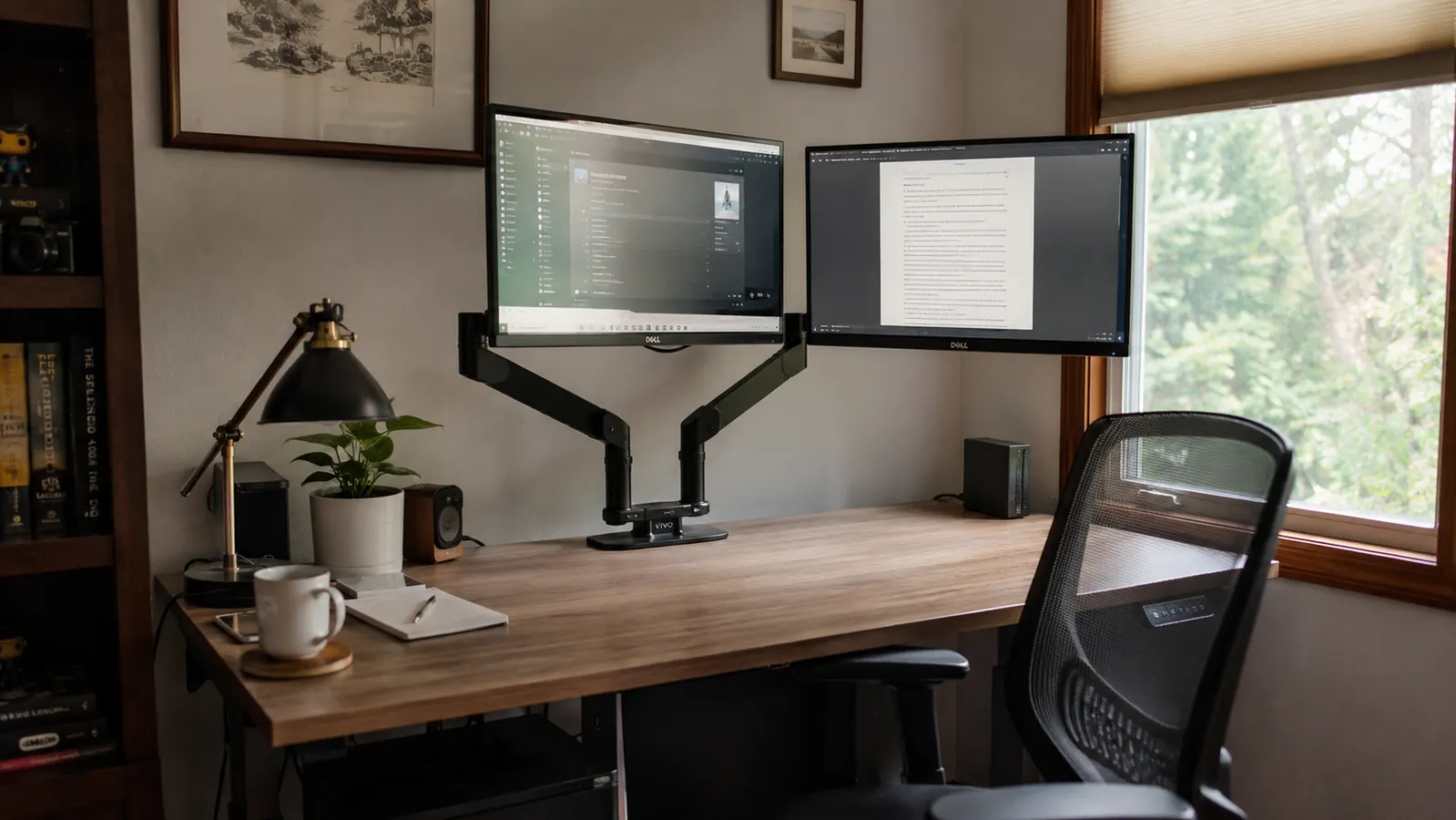
Six months ago I clamped a VIVO dual monitor mount to the back edge of my desk in the spare bedroom I've worked out of for nine years, and I honestly expected to be writing a very different review by now. My desk is a laminate model from a big box store, the kind with particle board under a thin veneer, and I've had cheaper monitor arms sag on furniture like that within a few weeks. The VIVO mount is the one piece of desk gear from this round of upgrades that I have genuinely not thought about since, which for me is the highest compliment I can give a piece of hardware. This is not a first-week impressions post. I've had two monitors hanging off this thing for half a year of real workdays, and I want to walk through what actually held up.
I bought the VIVO mount after years of stacking my second monitor on a cardboard box and a stack of old textbooks, which sounds like a joke but was genuinely my setup for longer than I'd like to admit. My neck had a permanent slight tilt to the left by the end of most days, and glare off both screens was a constant fight because neither one could actually be angled the way I needed. I didn't buy the VIVO mount because of the brand name, I bought it because the listing showed a full range of height, tilt, and swivel adjustment and the price fit a home office budget that had already gone toward a chair and a desk lamp that year.
The Quick Verdict
A sturdy dual monitor mount that held its position for six straight months on a cheap laminate desk, held back only by a cable channel that's tighter than it should be and a clamp that needs an accessible desk edge.
Amazon Check Today's Price →Still propping your second monitor on a stack of books?
The VIVO dual mount got both my screens off the desk and to eye level, and six months later they haven't drifted an inch. Check today's price and current availability on Amazon.
Amazon Check Today's Price on Amazon →How I've Used It
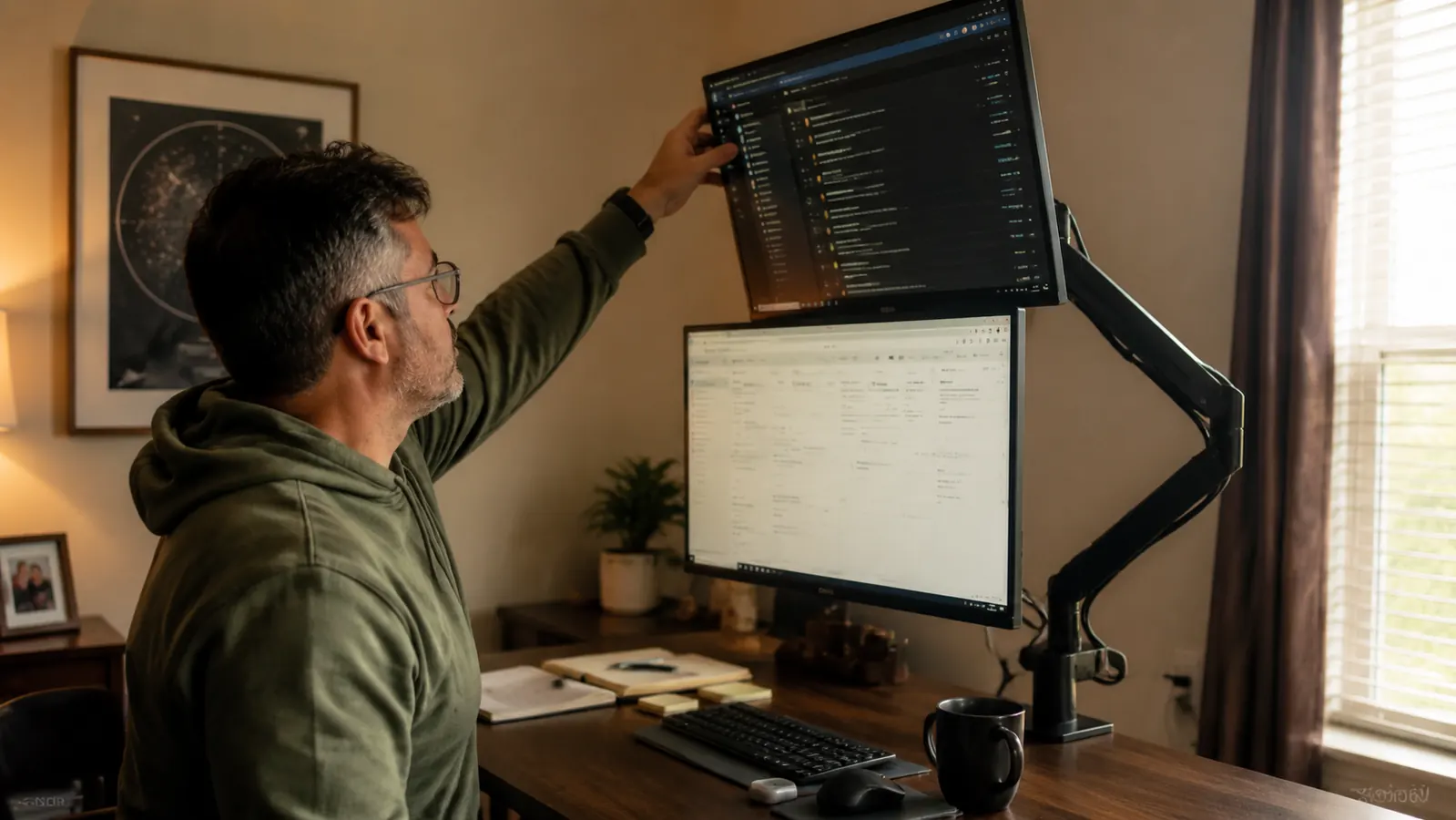
I'm a technical writer, so my day is mostly two monitors running side by side, one for whatever document I'm drafting and one for reference material, browser tabs, or a video call. That means both arms on the VIVO mount get moved almost daily, not just set once and forgotten. I raise the right screen slightly when I'm sharing my screen on a call so the camera angle looks less like I'm staring down at a laptop, and I pull the left screen closer and angle it inward when I'm doing heads-down writing. Six months of that kind of regular repositioning is a real stress test for any arm mechanism, not just a one-time height adjustment.
I set the VIVO mount up the day it arrived, clamped to the back lip of my laminate desk, and I've measured its position roughly once a month since, mostly by eye against a piece of painter's tape I stuck to the desk as a reference mark for where the base sat on day one. I also paid attention to things a spec sheet won't tell you, whether the gas spring arms would start drooping under the weight of two 24-inch monitors, whether the clamp would loosen on a desk that isn't solid hardwood, and whether the cable management channel would hold up once I actually ran power and HDMI cables through it instead of just admiring it empty.
I didn't baby it. My desk setup is nothing close to a showroom, laminate top, a keyboard tray I added later, and a power strip zip-tied to the underside. The VIVO mount had to work in that ordinary, slightly cluttered home office, not a clean product photo. I wanted to know if six months of daily adjustment on a budget desk would loosen the clamp or leave the arms sagging the way a cheaper single-arm mount I tried years ago eventually did within about two months.
The C-Clamp, Six Months In
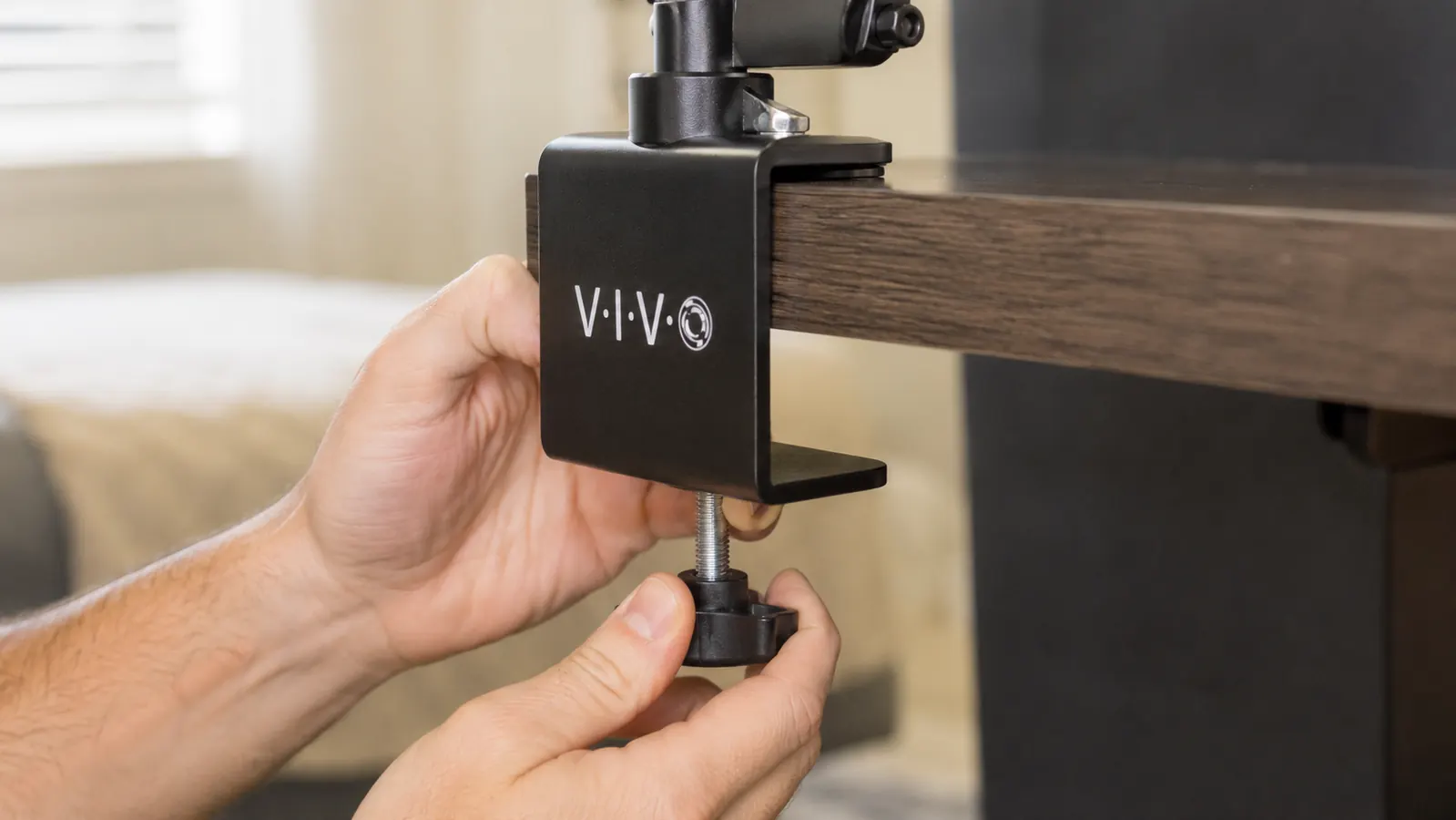
This is the part I was most worried about going in, because my desk is not solid wood and I've read enough reviews of other monitor mounts to know a clamp that grips fine on day one can work itself loose within a few weeks on softer materials. The VIVO clamp uses a wide steel plate on top and a threaded rod underneath that you tighten with a hex key against the bottom of the desk. I checked that bolt at the one-month mark expecting to find it had backed off slightly, and it hadn't moved. I've now checked it four more times since, most recently last week, and the tightness is identical to the day I installed it.
Part of that comes down to my desk having a decent lip at the back edge, roughly an inch and a half of clear material for the clamp plate to grip, which the VIVO mount needs to seat properly. If your desk has a very thin edge or a raised trim strip along the back, I'd measure before ordering, because the grommet mount option that comes in the box is the fallback for desks where the clamp doesn't have enough surface to bite into. I used the clamp option since my desk qualified, and after six months of daily arm movement, two monitors totaling close to 25 pounds combined, and one accidental bump from a rolling office chair, the base has not shifted position at all.
Whether the Arms Sagged Under Weight
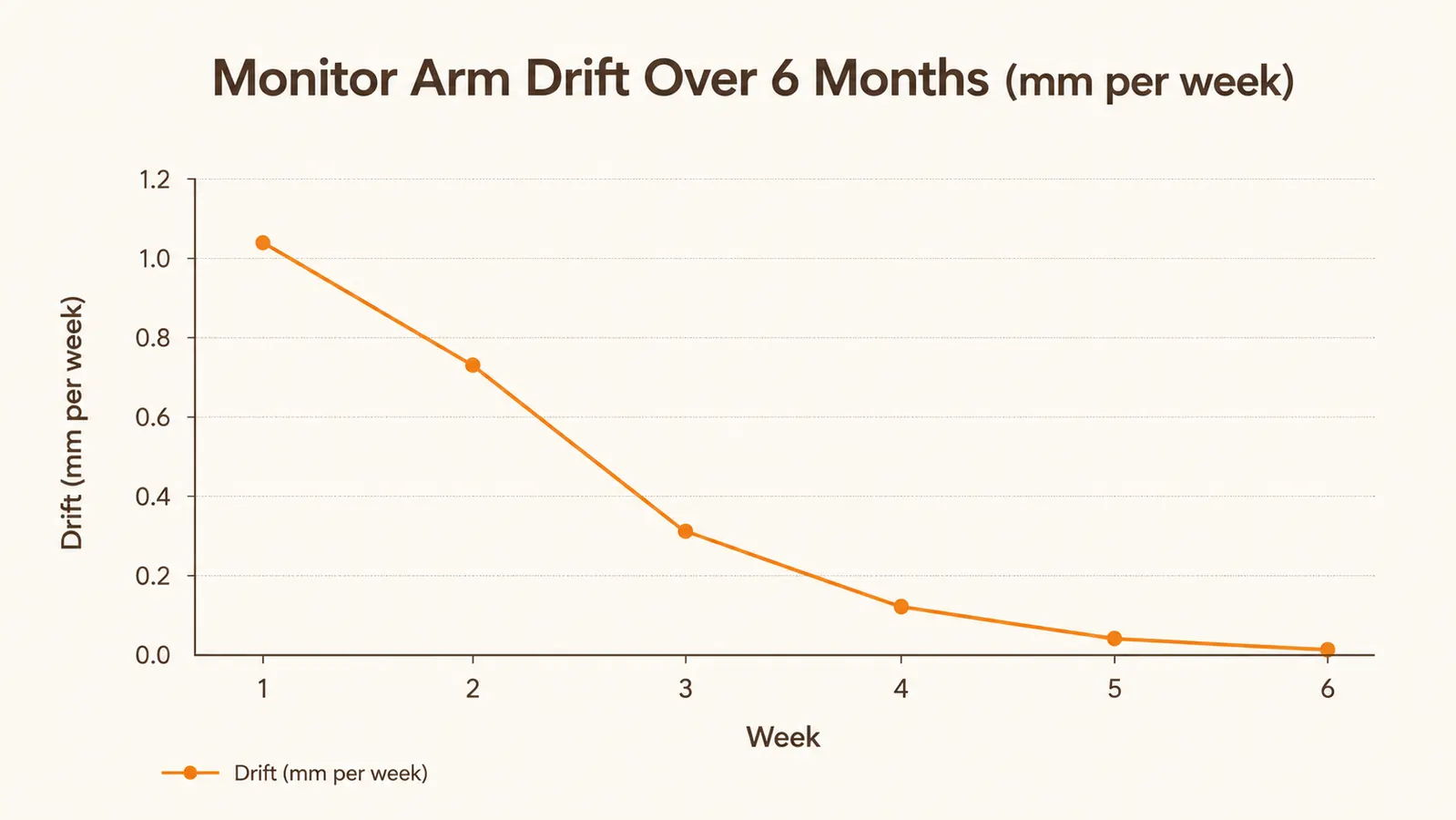
Gas spring arms are the part of any monitor mount I trust the least, because I've owned a cheaper single-arm version before that started drooping under a 22-inch monitor within about eight weeks, slowly creeping downward every few days until I was constantly re-tightening the tension knob just to keep the screen at eye level. That's the failure mode I was watching for with the VIVO mount, and it's the reason I built the drift chart for this review instead of just eyeballing it once and calling it done.
The short version is that both arms settled slightly in the first two weeks, a few millimeters of downward creep as the springs seated in under the actual weight of my monitors rather than the demo weight VIVO presumably tests with, and then they stopped moving entirely. By week six, both screens were holding exactly where I left them, and they still are today at six months. I run two 24-inch monitors, each right around the mount's rated capacity, and I was genuinely surprised the arms didn't need a single re-tightening after that early settling period. If your monitors are closer to the 22-lb ceiling this mount lists, I'd expect a slightly longer settling window than mine, but the mechanism itself has proven reliable.
Cable Management, the Honest Version
The VIVO mount includes a cable clip channel that runs along each arm, and it works, but it's tighter than I expected. My HDMI cables slid through fine, but once I added a USB-C cable and a small powered hub cable for a webcam, the channel got crowded enough that I ended up running one cable outside the clip and just letting it hang alongside the arm instead of forcing it through. It's not a dealbreaker, my desk still looks dramatically cleaner than it did with two monitors and a tangle of cords balanced on books, but I wouldn't call the cable management a solved problem if you're running more than two cables per arm.
What the VIVO mount did solve completely is the cable slack that used to bunch up on my desk surface. With both monitors floating above the desk instead of sitting directly on it, the cables now run down and back rather than pooling in front of my keyboard, which was a bigger quality-of-life change than I expected going in. I clean under my monitors maybe once every few weeks now instead of fighting a nest of cords every time I wipe the desk down.
Alternatives I Looked At First
Before landing on the VIVO mount, I spent about a week comparing it against a couple of other dual-arm mounts in a similar price range, plus a single fixed monitor riser I almost bought instead. The riser was tempting because it's simpler and cheaper, but it doesn't solve the actual problem I had, which was needing both height and tilt adjustment for two different screens doing two different jobs during my day. A fixed riser gets a monitor to eye level and stops there, and I'd already tried the stack-of-books version of that for years.
The other dual-arm mounts I looked at had similar specs on paper, but the reviews on a couple of them mentioned exactly the sagging issue I was trying to avoid, arms that held for the first month and then slowly drifted. What tipped it toward VIVO was the volume of long-term reviews specifically mentioning stability after several months, not just an unboxing. Six months later, for my desk and my two monitors, I think that held up. I get into the tradeoffs of a mount versus a simple riser in more detail in 10 reasons a monitor arm saves your neck at work, if you're still weighing whether you need a full arm setup at all.
What My Neck and Shoulders Actually Feel Like Now
The reason I bought the VIVO mount in the first place was the neck tilt from years of an uneven two-monitor setup, and that's the change I notice most six months in. Both screens now sit at the same height, angled slightly toward me, and the constant leftward lean I used to end most days with is gone. I still get up and stretch regularly because that's just good practice regardless of hardware, but I'm not doing it to relieve a specific ache in my neck the way I was before. Glare has also mostly gone away, since I can angle each screen independently away from the window instead of accepting whatever glare came with a fixed stack of books.
I also swivel the right monitor toward my desk lamp less often now, since raising both screens changed how the overhead light hits them compared to when they sat flat on the desk surface. It's a small thing, but six months of fewer adjustments to fight glare adds up to a meaningfully less annoying workday. If neck strain from a mismatched monitor setup sounds familiar, I go deeper into the mechanics of why height and angle matter in my honest take on installing and living with this same mount, including a few setup quirks I didn't cover here.
The constant leftward lean I used to end most days with is gone, and I'm not doing my afternoon stretches to relieve a specific ache anymore.
Who This Is For
If you're running two monitors at a home desk and you've been improvising a setup with risers, books, or mismatched stands the way I was, the VIVO mount is worth serious consideration. It's also a good fit if your desk isn't heavy-duty hardwood, since the C-clamp handled six months of daily adjustment on my laminate desk without loosening once. Anyone dealing with the kind of one-sided neck strain that comes from uneven monitor heights will likely notice the difference within the first couple of weeks of proper alignment.
Who Should Skip It
If your desk has a very thin back edge or raised trim that won't give the clamp plate enough surface to grip, check the grommet-mount measurements carefully before ordering, or you may end up needing the alternate mounting method. If you're running more than two cables per arm, the included cable channel will feel tight, and you should plan on at least one cable running loose alongside the arm rather than tucked inside the clip. And if you only run a single monitor, a simpler single-arm mount or a fixed riser is probably the better value than paying for a second arm you won't use.
What I Liked
- C-clamp held its exact position through six months of daily arm adjustment on a laminate desk
- Gas spring arms settled within two weeks and haven't drifted since, even at close to rated weight
- Independent height, tilt, and swivel on each arm solved my uneven neck strain within weeks
- Cable channel keeps most cords off the desk surface and out of the way
- Grommet mount included as a backup for desks that can't take the clamp
- Noticeably reduced glare by letting each screen angle away from the window independently
Where It Falls Short
- Cable channel gets crowded fast once you add a USB-C or hub cable beyond the basic video cable
- Requires a clear desk edge of roughly an inch and a half for the clamp to seat properly
- Initial assembly and cable routing took me close to 45 minutes the first time
- Arms settle slightly under real weight in the first couple of weeks, so expect one re-adjustment early on
Six months in, and this mount still hasn't moved an inch
The VIVO dual monitor mount isn't flawless, but the clamp held and the arms stopped sagging after the first couple of weeks, which is more than I can say for the mount it replaced. If your neck is still paying for a mismatched monitor setup, it's worth a look at today's price on Amazon.
Amazon Check Today's Price on Amazon →