

I spent the first six years of working from my spare bedroom in Boise sitting in a folding chair I originally bought for my kid's desk. By year three, my lower back ached by two in the afternoon almost every single day, and I told myself that was just what working from home felt like. It wasn't. It was the chair. When I finally swapped it for a real ergonomic chair, specifically a SIHOO B100 with adaptive lumbar support, most of that daily ache backed off inside of two weeks. Not because the chair is magic, and not because it cured anything, but because it finally let my spine sit the way it's supposed to for eight hours a day, five days a week, month after month.
Here's the part nobody tells you when you're shopping: buying an ergonomic chair and setting it up correctly are two completely different projects. I've watched three coworkers buy the exact same chair I use, unbox it, drop into it, and go right back to hunching over their keyboards within a week. The chair didn't fail them. They never adjusted it. This guide is the setup I actually use, in the order I do it, so the chair does its job instead of just sitting there looking expensive in the corner of a spare bedroom. None of this replaces a doctor if your pain is severe, radiates down a leg, or doesn't improve with better posture. It's simply what worked for a guy at a desk nine years running, written down in the order it happened.
My Back Stopped Aching Two Weeks After I Set This Up
If you're still sitting in whatever chair came with your desk, the SIHOO B100's adaptive lumbar support and wide headrest are worth a look before you spend another year hunched over a laptop.
Amazon Check Today's Price on Amazon →Step 1: Get the Seat Height and Hip Angle Right First
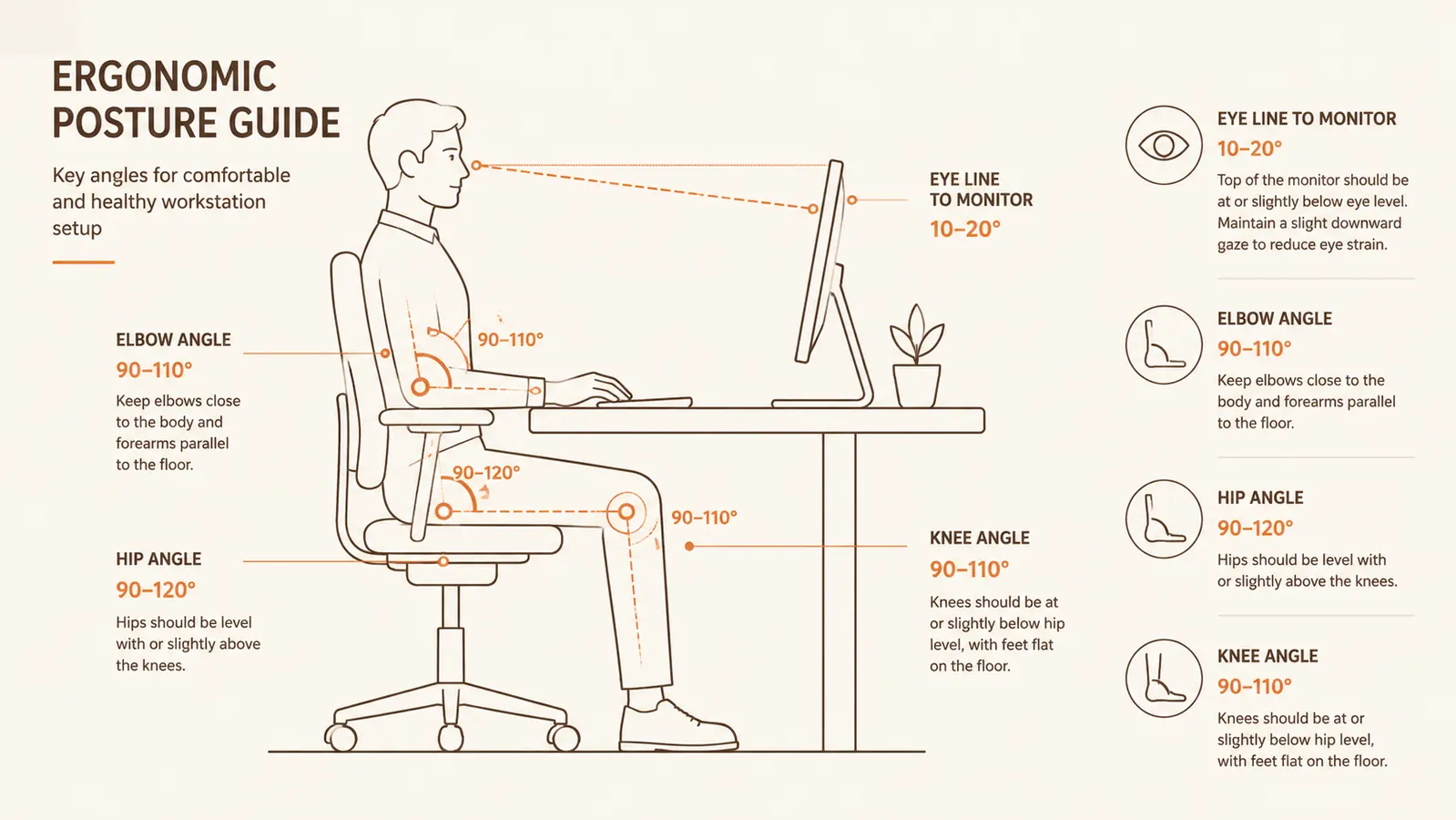
Before you touch the lumbar dial or the armrests, get the seat height correct. Sit down, plant both feet flat on the floor, and check that your knees sit at roughly a 90 to 100 degree angle, level with or just slightly below your hips. If your feet dangle or your knees are jammed up higher than your hips, everything else you adjust after this is compensating for a bad foundation instead of fixing anything. I made this exact mistake for a full month with my old chair, cranking the lumbar support tighter and tighter to fight a seat height that was two inches too high the whole time.
On the SIHOO B100, the gas lift gives you a wide enough range that this isn't a guessing game the way it was with my old hardware store chair, which only had about three inches of travel and split the difference badly no matter what I did. Sit down, pull the lever, and let your body weight settle the seat down until your feet land flat without you reaching for the floor. If your desk is a fixed height rather than adjustable, this is also the point where you decide whether you need a footrest instead of raising the chair too high to reach a keyboard at the correct elbow angle.
Give this step longer than feels necessary. I sit down, stand up, and resit two or three times to make sure the height holds once my full weight is in the seat. A chair that feels right for five seconds standing next to it can feel completely different once you've been sitting in it for twenty minutes and your muscles relax into it, which is usually when a bad height reveals itself.
Step 2: Set the Lumbar Support to Match Your Spine, Not the Chair's Default
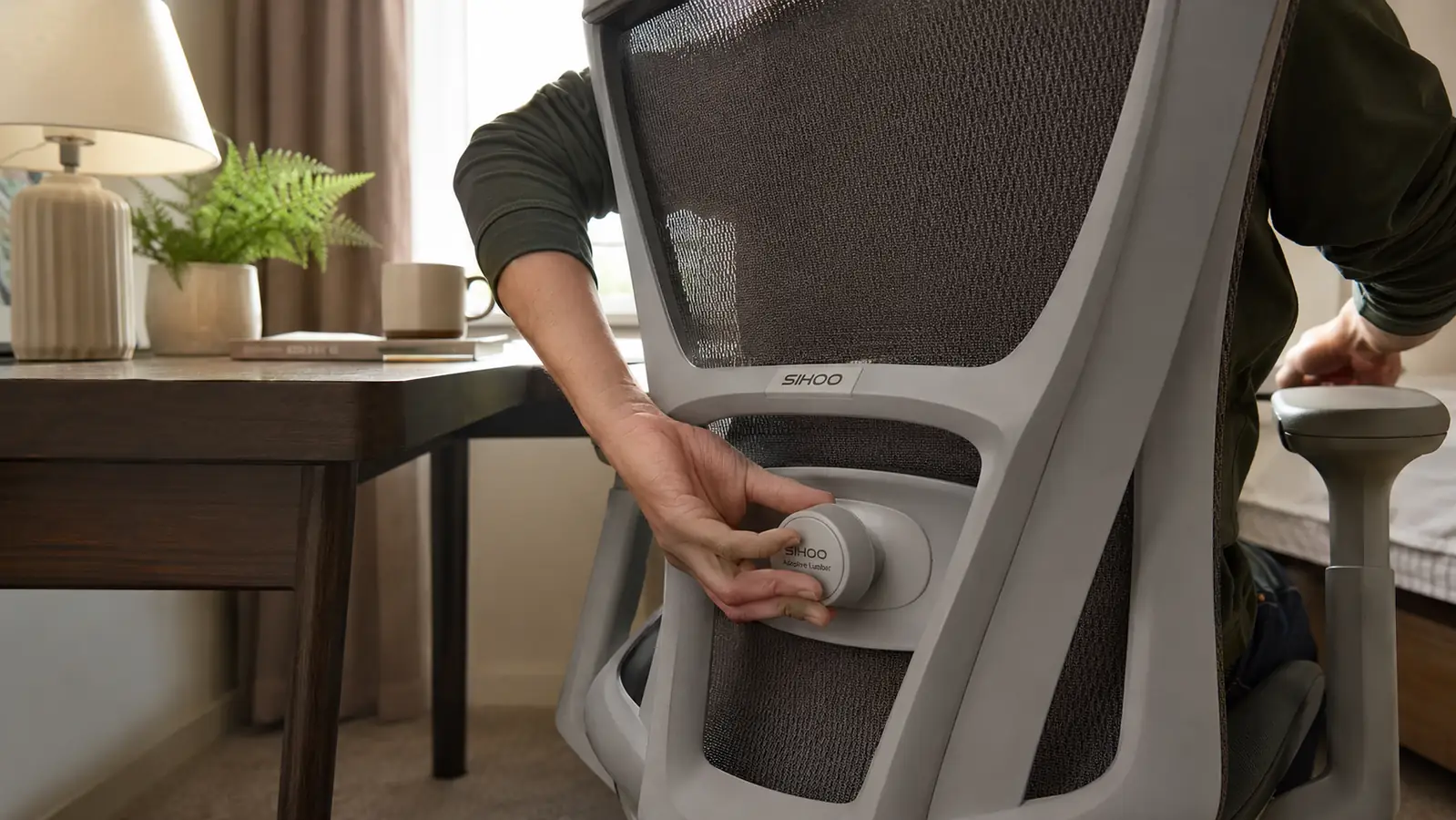
This is the step that actually deals with back pain, and it's the one most people skip because the chair looks fine without touching it. Your lower spine has a natural inward curve. When you sit in a flat-backed chair for hours, that curve collapses and the muscles around it tighten up trying to hold you upright on their own, hour after hour. A properly adjusted lumbar support fills that gap so your muscles can stop doing that job all day and just relax into the shape the chair is holding for you.
The SIHOO B100 uses an adaptive lumbar mechanism you dial in rather than a fixed pad, which matters more than it sounds like it should. I sit all the way back in the seat first, spine against the backrest, then turn the dial until I feel the support press into the small of my back without pushing me forward off the seat entirely. Too little and you're back to a flat wall behind you. Too much and it feels like someone's fist is in your back the whole afternoon. There's a narrow, correct middle, and it's worth taking five full minutes to find it instead of guessing once and never touching it again for a year.
I check this adjustment again after the first week. Your muscles change as they get used to actual support, sometimes loosening up enough that a setting which felt perfect on day one feels slightly too aggressive by day ten. That's a good sign, not a problem, it usually means the chair is doing what it's supposed to and your back is finally relaxing instead of bracing.
Step 3: Adjust Armrests So Your Shoulders Can Actually Relax
Most people never touch the armrests after unboxing a chair, which is a shame, because shoulder tension travels straight down into the upper back and adds to whatever's already going on lower down. Set the armrest height so your elbows rest at roughly a 90 degree angle with your shoulders relaxed, not shrugged up to meet the pad. If you can feel any lift in your shoulders while your hands are on the keyboard, the armrests are set too high and need to come down.
The B100's armrests move on more than one axis, so you can also pull them in or out to match your shoulder width, which matters more for people built narrower or broader than the chair's default setting assumes. I run mine narrower than the factory position because I'm not a big guy, and having them too wide meant my shoulders were rotating outward all day without me noticing until my upper back tightened up by evening, which took me weeks to connect back to the chair.
If you type with your wrists resting on the desk edge rather than floating, drop the armrests low enough that they're not in the way at all. An armrest that's fighting your typing posture is worse than no armrest, because you end up working around it all day instead of with it, which quietly recreates the same tension you bought the chair to fix.

Step 4: Dial In the Headrest and Recline Tension
The wide headrest on the SIHOO B100 is one of the features I underestimated when I first read the spec sheet. I don't lean back into it constantly while typing, but I use it heavily during calls and reading, and having somewhere for my neck to rest instead of holding my head forward toward a screen takes a real amount of strain off the base of my neck and upper shoulders by the end of the day, especially on days packed with back-to-back video calls.
Adjust the headrest height so it supports the base of your skull, not the middle of your neck, when you lean back at a comfortable recline. Too low and it pushes your chin down toward your chest. Too high and it does nothing at all and just sits there. Then set the recline tension, that's usually a knob underneath the seat, so the backrest resists you slightly rather than falling backward the moment you lean, or refusing to move at all when you want to shift positions during a long afternoon.
I keep my tension set loose enough that I can rock back during a long call without effort, but firm enough that the chair isn't swaying every time I reach for my coffee. Test this with a locked recline angle too if the chair offers one. Sitting in one fixed, correctly supported position for a video call beats a wobbly recline every single time, even if the wobble feels nice for the first ten minutes.
Step 5: Build the Habit Loop Around the Chair
A well set up ergonomic chair takes the constant, low-grade strain off your back, but it doesn't replace movement. I set a timer for every fifty minutes and stand up for at least two, even if it's just to refill water or walk to the mailbox. That habit did more for my long-term back pain than any single adjustment on the chair itself, and it's free, which is honestly the most annoying part of this whole guide.
I also went through and read 10 Reasons an Ergonomic Chair Stops Desk Back Pain after I'd had mine a few weeks, mostly to check whether what I was feeling matched what other people experienced, and it lined up with my own timeline closer than I expected it to. If you want the longer view on how the B100 actually holds up over months of daily use rather than just the first setup, I wrote up my full four-month review covering how the mesh, the lumbar mechanism, and the base held up under a real eight-hour workday.
Pair the chair with a posture check every few hours rather than a one-time adjustment and forget it. I still catch myself sliding forward in the seat by mid-afternoon some days, chin jutting toward the monitor like the old habit never fully left. Noticing it and resetting takes ten seconds. Ignoring it for a week is how the ache creeps back in no matter how good the chair is underneath you.
What Else Helps
The chair carries most of the load, but it isn't the only piece. Monitor height matters more than people expect, if your screen sits low enough that you're tipping your chin down all day, you'll reintroduce neck and upper back tension no matter how good the lumbar support is underneath you. Keyboard and mouse placement close enough that you're not reaching also keeps your shoulders from creeping forward. None of this is complicated or expensive to fix. It's mostly a matter of noticing where your body is actually working harder than it needs to and adjusting one thing at a time instead of assuming it's just how a desk job feels.
Two things I ignored for years that turned out to matter almost as much as the chair itself: glare and cable mess. Working with a window behind my monitor meant I was squinting and leaning forward to compensate, which put my back right back into the slouch I'd just fixed. Turning the desk sideways to the window solved most of it. And a floor tangled with cables under a small desk in a small room is more than a tripping hazard, it's one more reason to avoid standing up and moving around during the day, which quietly undoes the timer habit from the last step. A cheap cable tray under the desk fixed that in about twenty minutes.
The chair didn't fix my back. Sitting in it correctly did.
Still Sitting in the Chair That's Wrecking Your Back?
Nine years at a spare-bedroom desk taught me the chair matters more than almost anything else in a home office. The SIHOO B100's adaptive lumbar support is the single adjustment that changed my afternoons the most.
Amazon See Current Price on Amazon →